How a Link In Bio Tool Killed Our Website Traffic from Instagram (What to Do Instead!)
You know that we don't gatekeep around here at Social Savvy. We have to share a recent hiccup we had with our own marketing and how we overcame this...and we aren't holding back on the details.
What Happened?
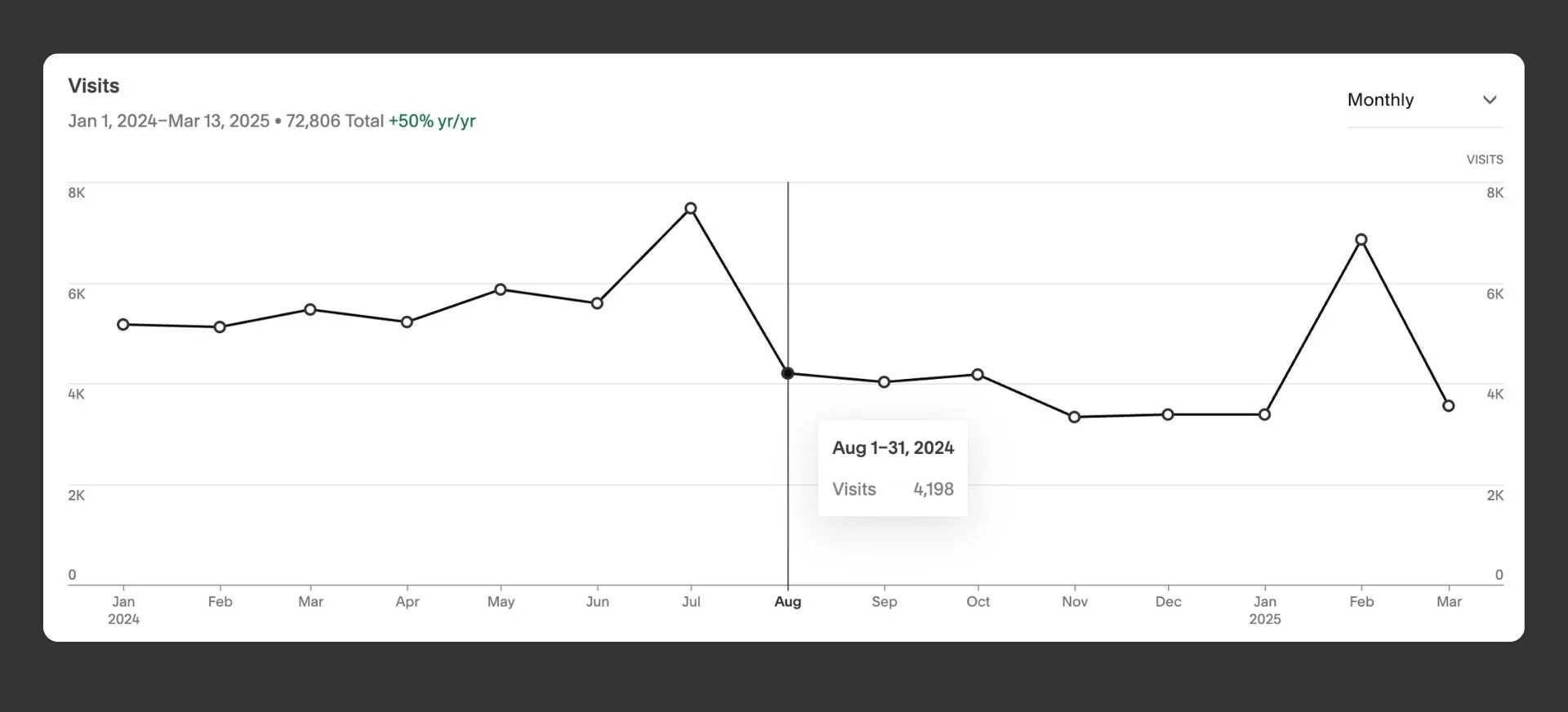
Between August and December 2024, we saw a noticeable dip in website traffic, and after looking into it, we realized why.
Our Instagram link tool was working against us. In July, visits peaked at over 7,000, but by August, they had dropped to 4,198 and continued to decline, reaching their lowest point in December.
The link tool we were using redirected traffic through an intermediary, meaning fewer people were landing on our actual site.
So, what changed?
We ditched the third-party link tool and built a simple link-in-bio page on our own site.
This lets us track our traffic directly in Google Analytics, drive more meaningful actions, and maintain full control over the experience. As soon as we adjusted our strategy in early 2025, traffic bounced back, spiking to over 7,000 visits in February.
Once we switched away from the link tool and directed people straight to our website, not only did our traffic spike back up, but we also saw improvements across the board.
Why this matters (and why you should do it too)
Using your own website for your Instagram (or TikTok, Pinterest, etc.) link hub means:
You own the data = better for tracking & retargeting
You improve SEO = those visits count toward your domain, not someone else’s
You create a cohesive brand experience from social to site = you better your buyer's journey
You avoid unnecessary redirects = help with your bounce rates
How to set up a custom link-in-bio page on your website:
It’s easier than you think. Let's walk through the process of creating your own link hub in steps:
Step 1: Create a new page on your website
Call it something like {yourdomain}/hello or {yourdomain}/link. Make it simple!
Step 2: Design it for mobile
Add in 3-10 important links. This could be:
Latest blog post
Freebie or lead magnet
Your services page
Contact form
Booking link
In this step, stick only with your essentials! Don't overwhelm your audience with every link you've ever had. Focus on what they need to see most, what you've referenced lately, and what they need to continue to go through your marketing funnel.
Step 3: Add tracking
Install Google Analytics (or your preferred analytics tool) and track this page separately. You can also add UTM parameters to the links to track exactly where people are clicking, or if your website has specific data, you can analyze that, too!
Step 4: Replace your link in bio
Once your page is live, swap out the old tool link with your custom one across your socials.
This was a major lesson in making sure our social media tools actually help drive traffic instead of getting in the way. Frequently evaluate the link in your bio and ensure people can easily find what they are interested in or looking for. This data will give you amazing insight into your audience's mind and trends!